Was this photo really taken here today? Check the caption against earlier copies
Use Google Lens on a desktop computer to find earlier image appearances, compare captions and dates, and record what still needs checking.
In this article
If a post says an image was taken here today, check the source and caption before you share it. Your first question is not whether the image was AI-generated. It is whether the image supports the claimed place and date.
Preserve the post as you received it: save the post URL, copy the caption exactly, and keep the image file or image URL if you can. This gives you a fixed version to compare later. Separate the caption into claims. “Today” is a date claim. “Here” is a place claim. Neither claim is answered by an image-generation result.
Search for earlier appearances on a desktop computer
Read the official Google Lens instructions, then use the route that fits what you have:
- On a computer, open Google and choose the image-search control.
- Upload the received image file and select it, or provide the image URL.
- Open candidate pages. Do not decide from a thumbnail alone.
- Compare distinctive details in the image itself: signs, building shapes, weather, clothing, vehicles, landmarks, shadows, cropping, or damage.
- Compare the captions. Note the named place and the displayed publication date on both the current post and each candidate page.
Google Lens results may include visually similar pictures and pages containing the same or a similar image. A similar scene is a lead, not a match. For example, two photos of a square may both show a clock tower, but different window patterns, signs, or camera positions may show that they are different images. Open the pages and compare the details that would be hard to match by chance.
A displayed date is evidence about when that page presents itself as published. It is not, by itself, proof of when the image was captured or who created it. An earlier matching appearance can challenge a new caption's date or location, but it does not establish the image's authorship.
Teaching exercise: record a caption discrepancy
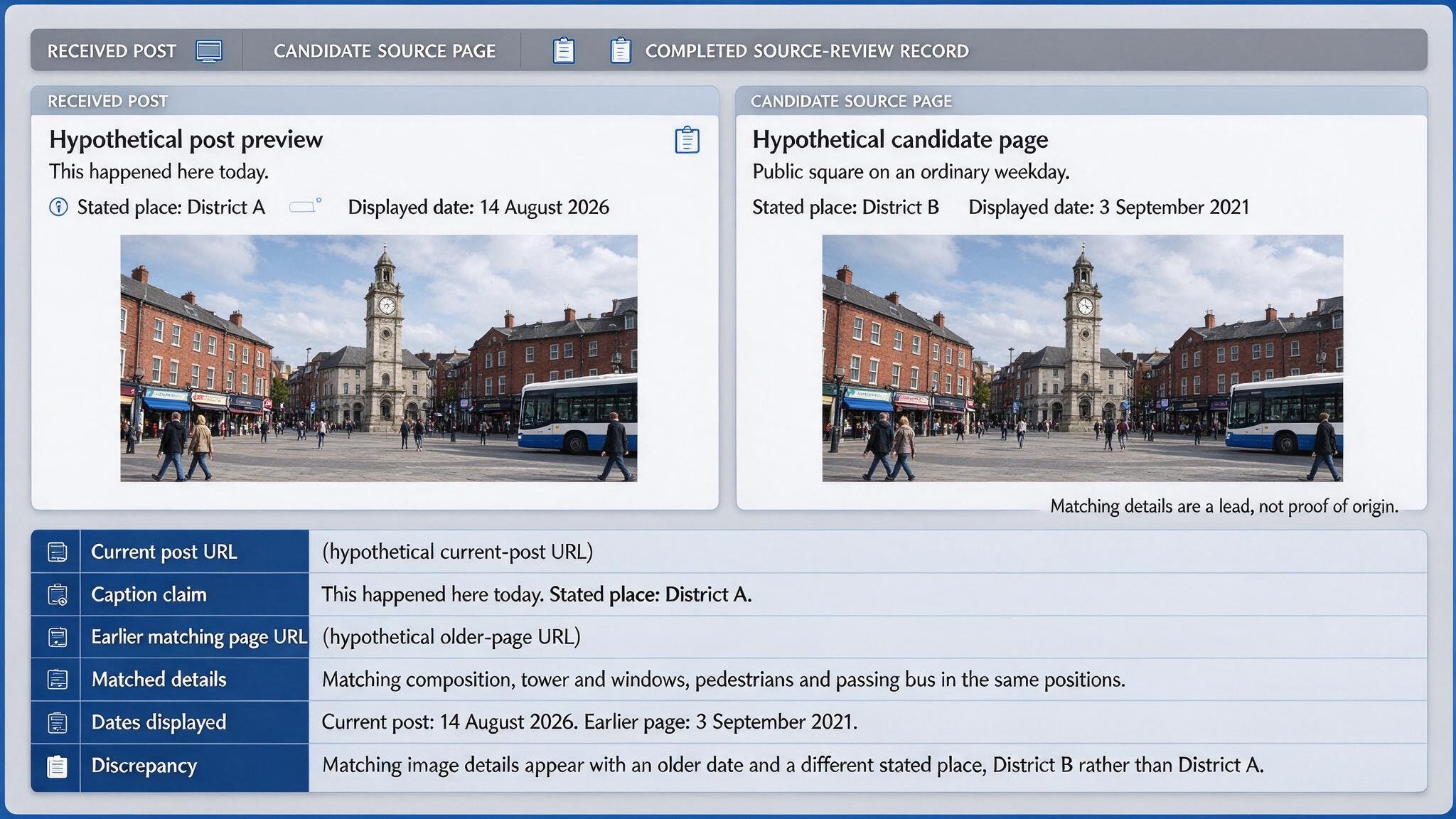
This is a hypothetical teaching exercise, not a real search result or incident. Suppose a post says, “This happened here today.” The post is presented as being from District A and displays 14 August 2026. A candidate page displays 3 September 2021 and identifies the location as District B.
When you open the candidate page, do not stop at the two dates. Suppose the clock tower and windows line up, and the pedestrians and a passing bus occupy the same positions in the same composition. The transient details strengthen the match: a shared building alone could appear in two different photographs. Record this as a strong candidate match for further review. Next, compare the words around the image. The received post presents the scene as current and local to District A; the older page states District B.
Your completed record could look like this:
Current post URL: (hypothetical current-post URL)
Caption claim: “This happened here today.” Post is presented as District A.
Earlier matching page URL: (hypothetical older-page URL)
Matched details: Matching composition, tower and windows, with pedestrians and a passing bus in the same positions.
Dates displayed: Current post: 14 August 2026. Earlier page: 3 September 2021.
Discrepancy: Matching image details appear with an older date and a different stated place, District B rather than District A.
Unresolved question: When and where was the image captured, and does the current post have evidence for its District A, today claim?
Next action: Do not treat the caption as confirmed; seek an original uploader or a reliable source that can identify the event's place and date.
The discrepancy is specific: the same image details appear alongside conflicting claims about place and timing. That is enough to withhold the new caption from sharing as confirmed. It does not tell you who made the image, whether the older page was the first publication, or the exact capture time.
Choose the next action from the result
You find an earlier matching image with a conflicting caption. Record both pages and the conflicting details. Do not repeat the newer date or location as established fact. Look for an original uploader, an official local source, or independent reporting that can directly identify the event.
You find a merely similar image. Keep it as a lead, then inspect more distinctive features and open other candidate pages. Do not record it as the same image until the details support that conclusion.
You find no useful match. Record that outcome and name the question still open. It does not prove authenticity or AI generation. Continue with a source that could address the caption directly, such as the original uploader, an official local source, or independent reporting.
Copyable source-review record
Copy this blank record and fill it in as you investigate.
Current post URL:
Caption claim:
Earlier matching page URL:
Matched details:
Dates displayed:
Discrepancy:
Unresolved question:
Next action:
If you also need to check whether the image shows signs of AI generation, use ZeroTrue's image detector for that separate question. Keep its result alongside your source record: it cannot confirm the caption's date or location.